


AUTOFLUID is the industry-leading CAD application suite that boosts the...
SITEMAP


Your HVAC or plumbing networks are modelled in 3D? Here’s the fastest way to create high quality 2D plans from them.
30.03.2026
Some project requirements now call for 3D modelling of HVAC and plumbing networks.
This approach brings clear benefits in terms of visualization, coordination, and maintenance. However, on the building site, 2D drawings are still the preferred format.
All modelling software can export plan views and sections. But when installing complex networks of different services in the same building, 3D visualisation rarely meets the standards of proper technical drawings.
No one can overlook the importance of high-quality 2D plans for installing HVAC and plumbing systems on site. Misinterpretations, back-and-forth between teams, and installation errors can be extremely costly. Even if your networks are perfectly modelled in 3D, poor-quality 2D drawings remain a major risk factor that can jeopardize your project.
So how can you quickly produce high-quality drawings from a 3D model?
AUTOFLUID: specialised in 2D HVAC and plumbing technical drawings
AUTOFLUID is a leading solution in France, used by the majority of MEP engineering offices for its simplicity and speed in producing highly readable and precise network drawings.
1/ AUTOFLUID exports your floor plans in a structured way directly from your Revit model.
2/ These are automatically processed into ready-to-use drawing backgrounds within seconds. Since building spatial data is also transferred from Revit, you can immediately start routing systems and placing equipment in full alignment with the model.
3/ Thanks to AUTOFLUID’s ultra-fast routing tools, advanced annotation features, and enhanced control over 2D drafting, your construction drawings are as clear, readable, and efficient as possible — in record time.
How does AUTOFLUID draw?
There are no blocks to configure. AUTOFLUID dynamically “draws” your networks and equipment instantly using lines, polylines, and curves. This ensures your .DWG files remain fully compatible and editable in any CAD software.
With 12 routing commands, you can design your networks using double-line, single-line, pipe arrays single-line, or underslab semi rigid pipes — all with unmatched precision and speed.
You can then annotate and finalize your drawings in just a few clicks, while AUTOFLUID automatically scales elements to ensure optimal readability, regardless of the output scale.
Simple
Ready to use and quick to learn. You can get started independently or become proficient after just a few hours of training (2hrs one-to-one visio training sessions or day long at your office sessions available).
AUTOFLUID runs directly within your CAD software: AutoCAD, ZWCAD, or BricsCAD — all well-known and reliable drafting environments.
Comprehensive
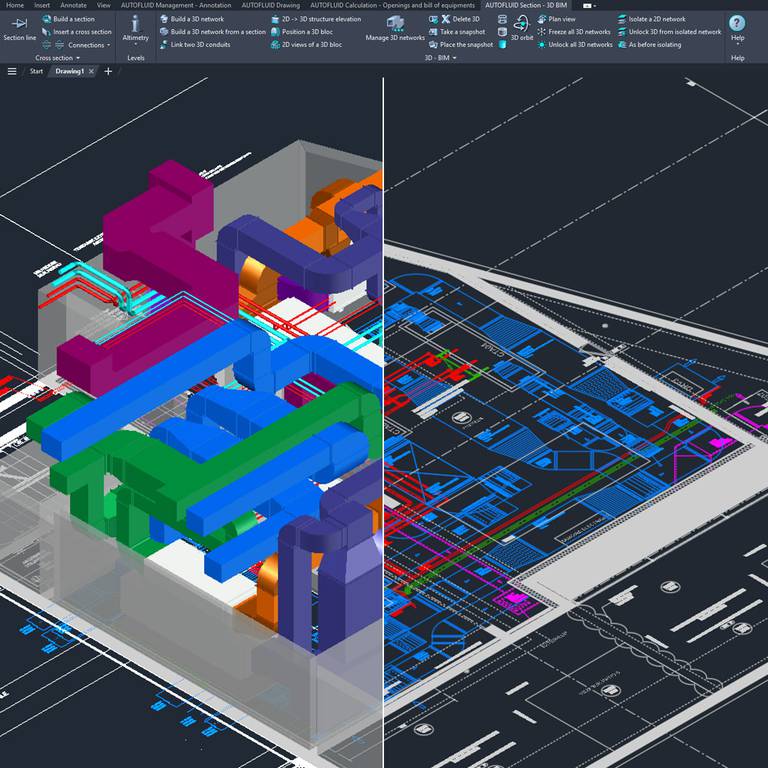
Simple doesn’t mean limited. Once your networks are drawn, you can leverage them to perform calculations, generate sections, and create 3D models — all directly from the 2D plan.
AUTOFLUID’s workflow covers all the needs of MEP engineers working on HVAC and plumbing systems:
1. Drawings background clean up
2. Network sizing calculations
3. Network routing and drawing annotation
4. Pressure loss calculations with export to Excel or CAD
5. Generating automatic sections from 2D
6. Instant BOM with Excel or CAD outputs
7. Openings plans with table lists exposts in Excel or CAD
8. 3D modelling, snapshot creation, and IFC export to BIM models
Save time with AUTOFLUID: try the full version free for 1 month.
News keywords Your HVAC or plumbing networks are modelled in 3D? Here’s the fastest way to create high quality 2D plans from them.
Company news |

|
MEP engineers: design, draw and model your HVAC and sanitary networks with unrivalled speed and quality.
28.04.2026
|

|
Your HVAC or plumbing networks are modelled in 3D? Here’s the fastest way to create high quality 2D plans from them.
Some project requirements now call for 3D modelling of HVAC and plumbing... 30.03.2026
|
|
|
Fast-track AUTOFLUID training courses via videoconference. In 2026, shift into high gear!
Get the year off to a good start by perfecting your methods and learning new... 23.02.2026
|


